
Wunderblick · by mynd
Feedback where you click.
Review videos, designs, documents, e-learning and live websites with one tool. Reviewers click directly on the work to comment, no account needed, and every round ends in a clear decision.
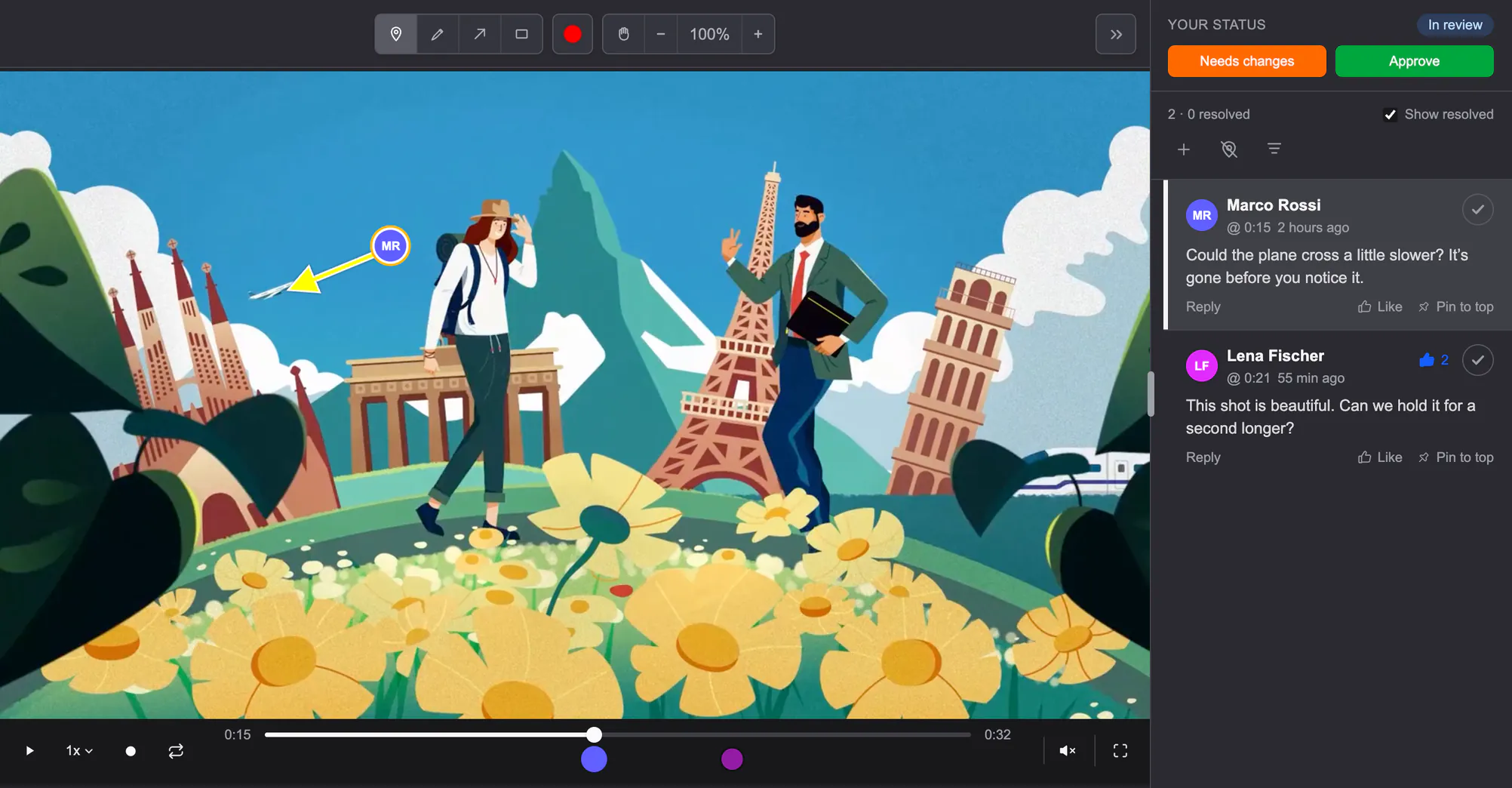

The real product at work: feedback on a video, then on an e-learning course, a few clicks each.
Try it on your own filesFrom first draft to final approval.
Share one link per audience, collect feedback right where it needs to be addressed, and close every round with a clear decision.
One link for each audience.
Drop in a video, design, PDF, e-learning package or website address, then copy a review link for your team, the client or any other team. Each link has its own settings: download, password, expiry and whether earlier versions are visible.
- Separate links for team, client or any other team
- Password, expiry and revoke on every link
- No account, no password for reviewers
Feedback exactly where it belongs.
Reviewers drop a pin, draw an arrow or a box, highlight text in a PDF or simply speak their comment and watch it turn into text. Every video comment keeps its timecode and shows up as a dot on the timeline.
- Pins, arrows, boxes and freehand drawing
- Frame-accurate timecodes on video
- Voice comments, transcribed live
Hand the open points to your AI agent.
Select the comments that need work and create an AI brief: numbered change requests with location, quoted text and a screenshot, with names, emails and phone numbers replaced in the text. Paste the expiring link into your own AI tool and let it apply the changes.
- Numbered change requests with screenshots
- Names, emails and phone numbers replaced in the text
- Expiring link you can revoke
Check every change, side by side.
Upload the next version and compare any two side by side or as an overlay with a crossfade. Linked playback moves both halves together, so you see at a glance that every comment was handled.
- Side by side or overlay
- Linked playback, scroll and zoom
- Links stay on the version they were made for
Know where every file stands.
Reviewers set their own status, Needs changes or Approved, and your project managers get an email. The review grid shows every file in every review layer at a glance, and when all feedback is in, a manager signs off a file, a folder or the whole project with one click.
- Clear verdict per reviewer
- Full overview with the review grid
- Quick sign-off with one click
Every format in one place.
One review flow for everything your team produces, so nobody has to learn a new tool per file type.
Video
Up to 5 GB, any resolution, comments on the exact frame
E-learning
Storyline, Rise, Captivate, HTML, SCORM
Images
Up to 100 MB, pins and drawings on any design
Slideshows
Several images as one review
Audio
Comments on the waveform
PDF
Up to 100 MB, pin, draw or highlight text
Word
Reviewed right in the browser
Live websites
Desktop or mobile layout
Built by a studio that reviews work with clients every day.
We made Wunderblick for our own video and e-learning productions. Now your team can work the same way, with any kind of media.
Click to comment
Pins, arrows, rectangles and freehand drawings land exactly where the feedback belongs.
Frame-accurate video review
Every comment keeps its timecode and shows up as a coloured dot on the timeline.
No account for reviewers
Clients join with their name and a 6-digit email code, or with just a name on open links.
Review layers
Separate links and comments for your team, the client or any other team, each with its own settings.
Version compare
Side by side or overlaid with a crossfade, with playback linked across both halves.
Clear approvals
Approve, Needs changes and one-click sign-off for a file, a folder or the whole project.
Your own AI
Connect Claude, ChatGPT or Cursor over MCP to read feedback and check new versions frame by frame, or hand open comments to any AI as an AI brief.
Voice comments and translation
Speak feedback instead of typing it, and translate client comments into your team’s language.
File transfer
Send or collect any files through one link. Recipients download everything as a ZIP.
Bring your own AI, over MCP
Give your AI a seat in the review.
Connect Claude, ChatGPT, Cursor or your own agent, and it reads the feedback, looks at every frame and page, and checks the next version, while your team does the work only people can do. In every plan.


An illustration of a review round with your own AI. The AI brief still hands open comments to any AI tool as a link.
It reads the feedback
Every comment with its pin, drawing, timecode, highlighted words and screenshot, on video, PDFs, images, slideshows, Word documents and e-learning courses. No more pasting feedback into a prompt.
It looks at the work
Frame by frame through a video, page by page through a PDF, close up on any detail, and through the words of every document and course slide.
It reviews for you
Have it check a new version against the brief, your brand rules or the last round, pin what it finds on the frame or highlight it in the text, translate comments and copy them between layers.
You keep the last word
It only works in the projects you allow, its comments carry its own name, it never replies to your clients or your team, and approvals stay with people.
A plan for every team.
Try everything free for 30 days, no card needed, with Starter’s limits: 5 team members, 250 GB of storage and unlimited projects. Every plan has every feature, and reviewers are always free.
Starter
€49
a month, or €490 a year with two months free. For small teams and studios.
- 5 team members
- 250 GB of storage
- Unlimited projects
- Unlimited reviewers and review layers
- Your own AI over MCP
Pro
€179
a month, or €1,790 a year with two months free. For agencies and teams with regular reviews.
- 15 team members
- 1 TB of storage
- Unlimited projects
- Unlimited reviewers and review layers
- Your own AI over MCP
- Add 5 team members for €49 or 500 GB for €49 a month
Enterprise
Custom
From €790 a month, on a yearly invoice.
- 50 team members and more
- Storage to fit, 5 TB and more
- Several workspaces
- Your own AI over MCP
- Priority support and custom terms
- Security assessment, setup and training
Wunderblick is for businesses. Prices exclude VAT. We remind you 5 days before your trial ends. After it a workspace pauses until you choose a plan, and nothing in it is deleted. Questions? Talk to us.
Questions, answered.
Can I try it before signing up?
Yes. Start a 30-day free trial, no card needed, and use every feature on your own files. The demo at the top of this page is the real review screen at work on a real video and a real e-learning course.
Do my clients need an account?
No. They open your review link, enter their name and email and type the 6-digit code we send them. On open-access links a name is enough; those reviewers can comment but need to verify their email before they can approve.
Which files can I review?
Video, images, audio, PDF, Word documents, image slideshows, zipped e-learning courses (Articulate Storyline, Rise, Captivate or any HTML or SCORM package) and live websites. Upload files or add them by link from Dropbox, Box or Google Drive. Videos can be up to 5 GB each, in any resolution and bitrate; PDFs and images up to 100 MB each.
Can I review an e-learning course or a website?
Yes. A Storyline, Rise or other HTML package runs as the real course: switch on comment mode to pin and draw on the current slide, and a screenshot of that slide is saved with the comment. A website opens live inside the review view and each comment records the page and a screenshot. Both can be reviewed in desktop or mobile layout.
How do versions work?
Upload a new version on any file and it becomes v2, v3 and so on. Links stay on the version they were made for, reviewers can look back at earlier versions if you allow it, and you can compare any two versions side by side or as an overlay.
What is the AI brief?
It turns the comments you select into numbered change requests with screenshots, locations and quoted text, replaces the names, emails and phone numbers it finds in the comments, and gives you an expiring link plus a ready-made prompt. Screenshots and quoted text aren’t changed, so check it before you share it. Paste it into your own AI tool together with the source file, and the agent applies the changes. You can revoke the link at any time.
Can I connect my own AI?
Yes, in every plan. Wunderblick has an MCP server. MCP, the Model Context Protocol, is the open standard AI tools use to work with other software. Add it to Claude, ChatGPT, Cursor, Claude Code or your own agent and allow it once: it works as you, only in projects where AI agents are allowed. It reads comments and files, looks at videos frame by frame and at PDF pages, and leaves comments with pins, drawings and highlighted words under its own name. It can also translate comments and copy them between review layers. It never replies to people, approves, shares or sends emails. Projects stored in Germany are closed to AI agents unless you open them.
Can the team discuss things the client should not see?
Yes. Mark a comment or reply as internal: it is tinted amber for your team and never shown to external reviewers. You can also run separate review layers, for example internal, client or any other team, on the same file.
How do I know when a client has approved?
The reviewer clicks Approve or Needs changes, your project managers get an email, and the review grid shows the status of every file in every review layer. If a reviewer only comments, the managers get a summary email an hour later.
Where is my data stored?
The app and database run in Germany. Files are stored in the EU by default, and video playback uses a worldwide network. Switch on Store in Germany for a project and its new files and videos stay in Germany; files uploaded earlier don’t move. Service emails and optional translation use providers elsewhere. The security page lists everything in detail.
See Wunderblick with your own work.
Start right away, or tell us what your team reviews and we will help you set up your first project.